
An ERP can transform how a business runs: one system for purchase, inventory, production, billing and accounts, with reports available whenever you need them. It can also become an expensive system that staff avoid while the old spreadsheets quietly continue. The difference is rarely the technology. It is almost always the preparation.
Whether you plan to buy, customise or build an ERP from scratch, these are the things to get right first.
Why ERP projects struggle
The most common reasons are consistent across industries:
- Trying to launch every module at once
- Automating a messy process instead of fixing it first
- Poor-quality data migrated from old systems
- The people who use the system daily were not involved in designing it
- No clear definition of what success looks like
Each of these can be avoided with planning before any code is written.
1. Map your processes before choosing features
Walk through how work actually moves today, from enquiry to delivery and payment. Who creates a purchase order? Who approves it? How does stock get issued to production? Where do errors or delays happen?
Write this down with the people who do the work, not only managers. You will often find steps that exist only because of old limitations, and those should be simplified rather than rebuilt in software.
2. Decide which modules come first
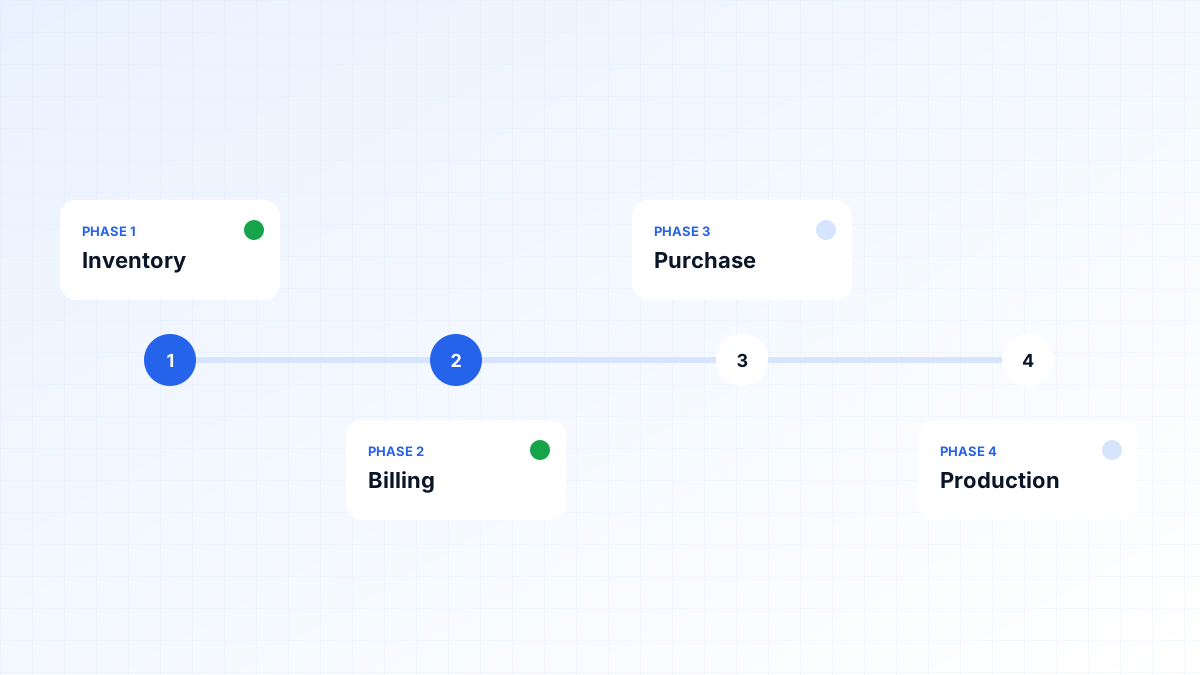
An ERP does not need to arrive all at once. Rank modules by how much pain they remove and how many other modules depend on them. For many trading and manufacturing businesses, a sensible order looks like this:
- Inventory and item masters — the foundation almost everything else depends on
- Billing and sales — GST invoicing, quotations and receivables
- Purchase and vendors — requests, approvals and goods receipt
- Production — bills of materials, work orders and consumption
- HR, payroll and advanced reporting
Each phase should go live, be used and be refined before the next begins. This keeps the business running and gives your team time to adapt.
3. Start cleaning your data early
An ERP is only as reliable as the data inside it. Duplicate customers, inconsistent item names and outdated opening balances will follow you into the new system unless they are fixed. Begin early:
- Standardise item names, units and codes
- Merge duplicate customer and vendor records
- Verify opening stock with a physical count
- Reconcile receivables and payables before migration
4. Plan integrations from the beginning
List every system the ERP needs to exchange data with: accounting software such as Tally, GST e-invoicing and e-way bill workflows, your eCommerce store or dealer portal, payment gateways, barcode scanners and WhatsApp or SMS notifications. Integrations affect architecture, so they should be part of the first design discussion rather than an afterthought.
5. Involve the people who will use it every day
Store staff, accountants and dispatch teams know where the real friction is. Include them in requirement workshops and in reviewing screen designs. When users help shape the system, adoption follows naturally — and you avoid building features nobody needs while missing the ones everybody does.
6. Budget time for training and change
New software changes daily routines. Plan for hands-on training by role, simple written guides, a period where support is readily available, and a clear date when the old spreadsheets stop being used. Without that last step, many teams end up maintaining two systems.
7. Define what success looks like
Agree on a few measurable goals before development starts, for example:
- Stock records match physical counts within an agreed tolerance
- Month-end closing takes days instead of weeks
- Invoices are generated the same day goods are dispatched
- Owners can view orders, stock and receivables without asking for a report
Measure these before and after each phase. It keeps the project focused on business outcomes rather than feature lists.
Build, buy or customise?
If your processes match a ready-made ERP closely, buying and configuring one is usually quicker. A custom ERP makes sense when you have unique pricing, production or approval workflows, need only specific modules, or want tight integration with other systems you already use. Our article on custom versus off-the-shelf software covers this decision in more detail.
If you are planning an ERP, BeGrids can help map your processes, prioritise modules and build a system your team will actually use. Book a free consultation to talk through your requirements.