Running a business involves managing customers, employees, sales, inventory, accounts, and daily operations. As a business grows, handling everything through spreadsheets, separate software, and manual processes can become difficult. This is where business management software becomes important.
Two popular solutions that help businesses improve their operations are CRM (Customer Relationship Management) and ERP (Enterprise Resource Planning) software.
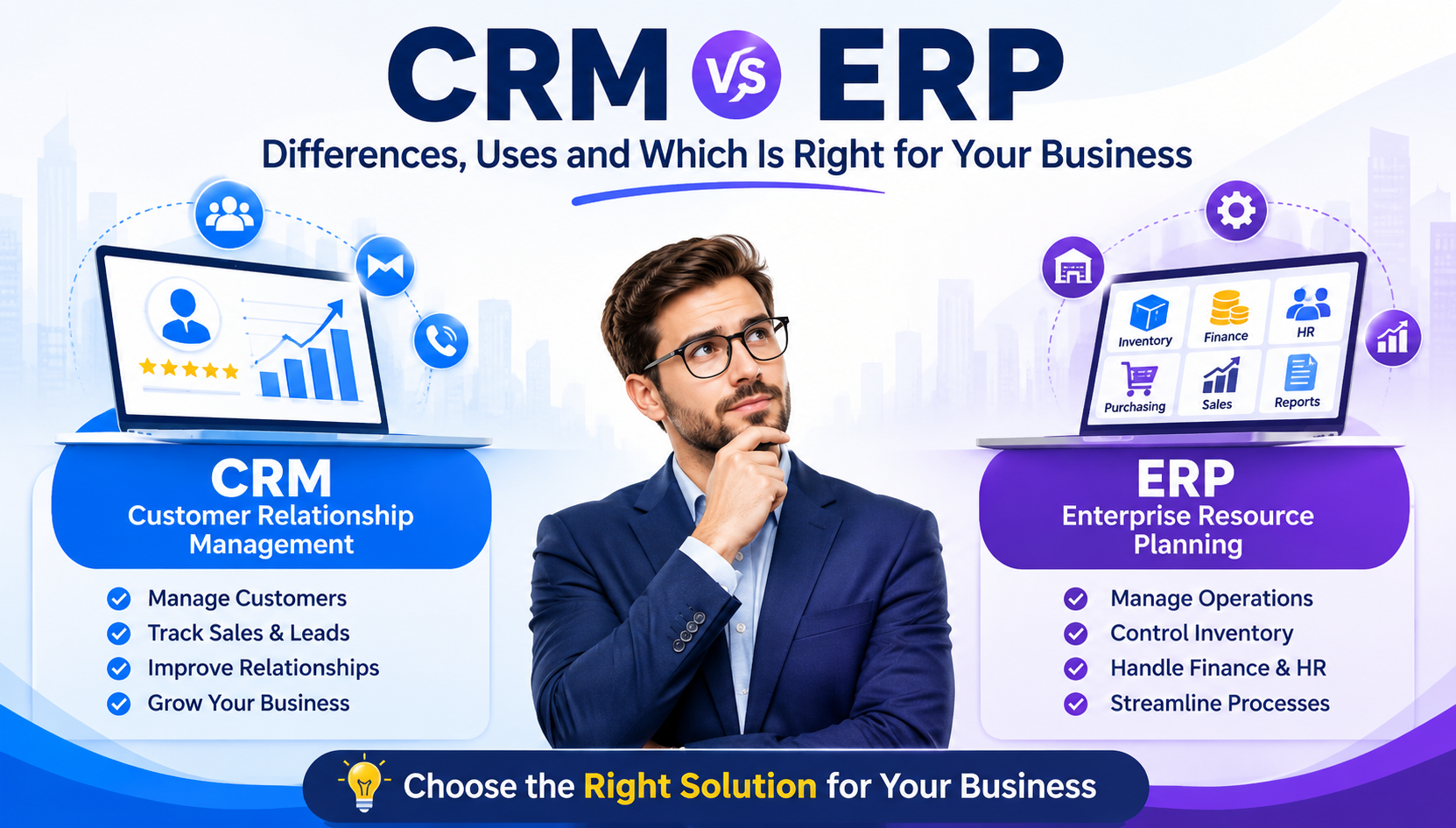
Although both systems help businesses work more efficiently, they serve different purposes. CRM software focuses mainly on customer relationships, sales, and marketing, while ERP software manages different business operations through a centralized platform.
But which one should your business choose? Do you need CRM, ERP, or both?
In this guide, we will explain the difference between CRM and ERP, their features, benefits, business applications, and how to select the right solution according to your business requirements.
What Is CRM Software?
CRM stands for Customer Relationship Management. It is software designed to help businesses manage customer information, sales activities, communication, and relationships from one centralized system.
Instead of maintaining customer details in different files or remembering follow-up dates manually, a CRM system stores important information in one place.
For example, when a potential customer contacts your company through a website, social media, or phone call, your sales team can record their details in the CRM system. They can track conversations, schedule follow-ups, manage sales opportunities, and monitor the progress of each lead.
Key Features of CRM Software
Some important CRM software features include:
- Lead Management: Capture, organize, assign, and track potential customers.
- Contact Management: Store customer names, phone numbers, email addresses, and communication history.
- Sales Pipeline Management: Monitor sales opportunities from the first inquiry to the final deal.
- Follow-Up Reminders: Schedule calls, meetings, and customer follow-ups.
- Marketing Automation: Manage campaigns, customer segments, and marketing activities.
- Customer Support Management: Track complaints, service requests, and support tickets.
- Reports and Analytics: Understand sales performance, lead conversion, and team productivity.
Benefits of CRM Software
CRM software helps businesses build stronger customer relationships and improve their sales processes.
- Improves lead management and follow-up activities.
- Helps sales teams close deals more efficiently.
- Reduces the chances of missing potential customers.
- Keeps customer information organized.
- Improves communication between sales and support teams.
- Provides better visibility into sales performance.
CRM is particularly useful for businesses that depend on customer inquiries, sales teams, repeat purchases, and long-term customer relationships.
What Is ERP Software?
ERP stands for Enterprise Resource Planning. It is business management software that connects multiple departments and business activities through a centralized platform.
An ERP system helps businesses manage their internal operations, including accounting, inventory, purchasing, sales, employee information, production, and reporting.
For example, when a company receives a new sales order, its ERP system can help update inventory records, generate invoices, manage payment information, and provide relevant data to different departments.
This reduces the need to maintain separate software for every business function.
Key Features of ERP Software
Modern ERP software can include several business management modules:
- Inventory Management: Monitor stock levels, product movement, and warehouse operations.
- Accounting and Finance: Manage expenses, invoices, payments, and financial reports.
- Purchase Management: Track suppliers, purchase orders, and procurement activities.
- Sales Management: Manage sales orders, quotations, and billing.
- Human Resource Management: Maintain employee records, attendance, payroll, and leave information.
- Production Management: Manage manufacturing processes, materials, and production schedules.
- Business Reporting: Generate reports to understand overall business performance.
- Workflow Automation: Reduce repetitive tasks and improve coordination between departments.
Benefits of ERP Software
ERP software helps businesses manage their operations with better control and visibility.
- Connects different departments through one platform.
- Reduces manual data entry and repeated work.
- Improves inventory and financial management.
- Helps maintain accurate business records.
- Makes business reporting easier.
- Improves coordination between teams.
- Supports business expansion and operational growth.
ERP software is useful for manufacturing companies, distributors, wholesalers, retailers, service providers, and growing businesses that need better control over multiple operations.
CRM vs ERP: What Is the Main Difference?
The biggest difference between CRM and ERP is their primary purpose.
CRM focuses on customers and revenue generation, whereas ERP focuses on internal business operations and resource management.
Here is a simple comparison:
ComparisonCRM SoftwareERP SoftwareFull FormCustomer Relationship ManagementEnterprise Resource PlanningMain PurposeManage customer relationshipsManage business operationsPrimary FocusSales, marketing, customersFinance, inventory, HR, purchasingMain UsersSales and marketing teamsFinance, HR, operations, managementCustomer DataDetailed customer profilesCustomer and transaction recordsSales ManagementLeads and sales pipelinesOrders, quotations, and billingInventoryUsually limited or integratedAdvanced inventory managementAccountingBasic or integrated featuresComprehensive financial managementAutomationSales and customer workflowsBusiness and departmental workflowsMain BenefitBetter customer relationshipsBetter operational efficiency
In simple terms, CRM helps businesses get and retain customers, while ERP helps them manage the resources and processes required to run the business.
CRM vs ERP: Practical Business Examples
Understanding the difference becomes easier when we look at real business situations.
Example 1: A Digital Marketing Company
Imagine a digital marketing agency receiving inquiries from different sources, including its website, Facebook, Instagram, and Google Ads.
The company needs to track potential clients, schedule meetings, send proposals, and follow up with interested customers.
A CRM system can help the agency:
- Collect and organize incoming leads.
- Assign inquiries to sales executives.
- Track proposal status.
- Schedule customer follow-ups.
- Monitor monthly sales performance.
If the same company also wants to manage employee salaries, expenses, invoices, purchases, and financial reports, an ERP system can help manage those operations.
Example 2: A Manufacturing Business
A manufacturing company needs to manage raw materials, production schedules, warehouse stock, supplier payments, and customer orders.
An ERP system can connect these activities and provide better operational visibility.
A CRM system can separately help its sales team manage customer inquiries, quotations, and business relationships.
Both solutions can work together to improve overall business performance.
Can a Business Use Both CRM and ERP?
Yes. In fact, using CRM and ERP together can be a practical choice for businesses that want to manage customer relationships as well as internal operations.
When both systems are connected, information can move between departments more efficiently.
For example:
- A potential customer contacts the company.
- The sales team records the inquiry in the CRM.
- After the customer confirms the order, the information is transferred to the ERP system.
- The ERP system processes the order and updates inventory.
- The finance department generates the invoice and tracks payment.
- The sales team can access relevant order information for customer communication.
This connected workflow reduces unnecessary data entry and helps teams work with more consistent information.
However, businesses should check integration capabilities, data synchronization, user permissions, and implementation costs before selecting separate CRM and ERP platforms.
CRM vs ERP: Which Is Right for Your Business?
The right choice depends on your business size, industry, current challenges, and future requirements.
Choose CRM Software If:
- Your business receives regular customer inquiries.
- Your sales team struggles to manage follow-ups.
- You want to improve lead conversion rates.
- Customer communication is spread across different platforms.
- You want to track sales activities and marketing campaigns.
- Building long-term customer relationships is a priority.
Choose ERP Software If:
- You manage inventory, purchasing, and billing.
- Multiple departments work with separate records.
- Financial reporting takes too much time.
- You need better control over business operations.
- You want to automate internal workflows.
- Your company is expanding and needs centralized management.
Choose Both CRM and ERP If:
- Your business has a growing sales team and multiple departments.
- You want to connect customer management with operational activities.
- You handle a large number of orders and transactions.
- You need centralized reporting across different business functions.
- Your long-term plan involves business automation and expansion.
CRM vs ERP: Cost and Implementation Considerations
The cost of CRM and ERP software depends on the number of users, required modules, customization, integrations, hosting infrastructure, and ongoing support.
CRM solutions are often simpler to implement because they generally focus on customer-facing activities.
ERP implementation can require more planning because it may involve multiple departments, existing business records, financial workflows, inventory processes, and employee training.
Before selecting either solution, consider the following expenses:
- Software licensing or development cost.
- Customization and additional modules.
- Data migration and integration.
- Hosting and infrastructure.
- Employee training.
- Maintenance and technical support.
For small businesses, starting with essential features and expanding gradually can be a sensible approach. Avoid paying for modules that your business does not currently need.
Custom CRM and ERP Software: Is It Worth Considering?
Ready-made CRM and ERP platforms offer useful features, but they may not always match the exact working process of every business.
For example, a manufacturing company may need production tracking, raw material management, and supplier workflows that are different from those of a retail business.
Similarly, a service company may require custom lead assignment, quotation approvals, project tracking, and automated customer notifications.
This is where custom CRM and ERP software development can help.
A customized solution can be designed around your actual business requirements, including:
- Business-specific workflows.
- Custom dashboards and reports.
- Role-based access and permissions.
- Third-party software integrations.
- Mobile-friendly access.
- Automated notifications and approvals.
- Scalable database and application architecture.
With the right planning, businesses can build a system that supports their existing operations while allowing room for future growth.
Important Factors to Consider Before Choosing CRM or ERP
Before investing in business management software, evaluate these important factors:
1. Understand Your Business Problems
Identify whether your biggest challenges are related to customer management, sales, inventory, accounting, or internal operations.
2. Identify Required Features
Prepare a list of essential features instead of selecting software based only on the number of available modules.
3. Check Ease of Use
The software should be easy for employees to understand and use in their daily work.
4. Consider Integration Options
Check whether the software can connect with your existing website, payment gateways, accounting tools, communication platforms, and other applications.
5. Evaluate Security
Look for secure authentication, role-based access, data backups, encryption, and proper access controls.
6. Plan for Future Growth
Choose a solution that can support additional users, departments, transactions, and business requirements as your company expands.
Conclusion
CRM and ERP software both play important roles in modern business management, but they solve different problems.
CRM is the right choice when your priority is managing customer relationships, improving sales, and organizing leads. ERP is more suitable when you need better control over inventory, accounting, purchasing, employees, and internal operations.
For growing businesses, combining CRM and ERP can create a more connected business environment where customer information and operational activities work together.
The best solution is not necessarily the one with the most features. It is the one that fits your business requirements, simplifies everyday work, and supports long-term growth.
If you are planning to improve your business operations, explore custom software development solutions from BEGRIDS. The right business software can help you reduce manual work, improve productivity, and manage your business more efficiently.
Frequently Asked Questions (FAQs)
1. What is the difference between CRM and ERP?
CRM manages customer relationships, sales, leads, and marketing activities. ERP manages internal business operations such as accounting, inventory, purchasing, HR, and production.
2. Is CRM a part of ERP?
Not necessarily. CRM and ERP are separate software systems, although many ERP platforms offer built-in CRM modules or integrations.
3. Which is better for small businesses, CRM or ERP?
It depends on business requirements. CRM is useful for managing leads and customers, while ERP is better for managing inventory, accounts, purchasing, and other operations.
4. Can CRM and ERP work together?
Yes. CRM and ERP can be integrated to connect customer information, sales orders, inventory, invoicing, and other business processes.
5. Is ERP software suitable for small businesses?
Yes. Small businesses can use ERP software to manage billing, inventory, accounting, purchasing, and other essential operations. They can start with basic modules and expand when needed.
6. How much does CRM and ERP software cost?
The cost varies depending on features, users, customization, integrations, hosting, and support. Custom-developed solutions may have different pricing based on project requirements.
7. What is the difference between CRM, ERP, and business management software?
CRM focuses on customer relationships, ERP connects internal business operations, and business management software is a broader term that can include CRM, ERP, accounting, HR, inventory, and other business tools.
8. Can I develop custom CRM and ERP software for my company?
Yes. Custom CRM and ERP software can be developed according to your business processes, industry requirements, workflows, and future expansion plans.